
Mangal Typing Keyboard Layout: Complete Guide to Hindi Typing, InScript and Remington GAIL
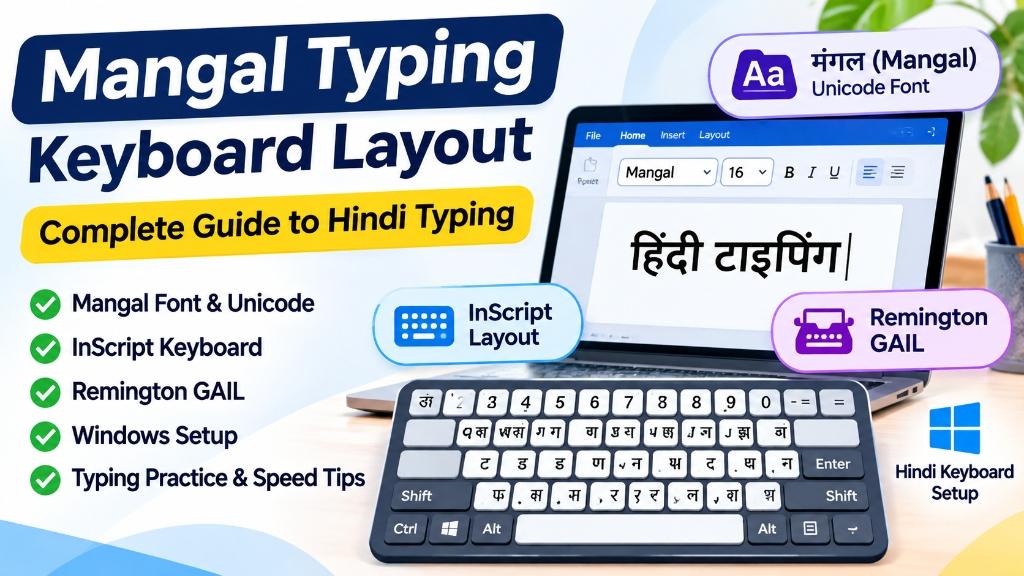
However, there is one important thing every beginner should understand: Mangal is a Hindi Unicode font, not a keyboard layout. The keyboard layout determines which Hindi character appears when you press a particular key, while the font determines how that character looks on the screen.
You can type Hindi text using different input layouts, including InScript and Remington GAIL, and display the resulting Unicode text using the Mangal font.
In this guide, we will explain what Mangal typing means, how the Hindi keyboard works, the differences between InScript and Remington GAIL, how to enable Hindi typing on Windows and how to practise for government typing examinations.
---
What Is Mangal Typing?
Mangal is an OpenType Unicode font designed for the Devanagari script. It is commonly used for displaying Hindi text in documents, official correspondence, educational material and government applications.
When someone says they are practising Mangal typing, they generally mean that they are entering Hindi text using a Unicode-compatible keyboard layout and displaying the text in the Mangal font.
For example, when you type the Hindi word:
भारत
The text is stored as Unicode characters rather than as an arrangement of English letters that merely looks like Hindi.
This is important because Unicode Hindi text can be copied, searched, edited and processed by compatible applications without depending on the exact font installed on another computer.
Mangal supports Devanagari text rendering, including the character combinations required for proper Hindi display.
Mangal Font vs Hindi Keyboard Layout
These two terms are often confused by beginners.
| Feature | Mangal Font | Hindi Keyboard Layout |
|---|---|---|
| Purpose | Displays Hindi characters | Enters Hindi characters |
| Function | Controls appearance | Controls key mapping |
| Example | Mangal | InScript |
| Another Example | Nirmala UI | Remington GAIL |
| Main Role | Text rendering | Text input |
Think of it this way:
- The keyboard layout decides what you type.
- The Unicode encoding represents the characters.
- The font determines how those characters are displayed.
---
Which Keyboard Layout Is Used for Mangal Typing?
There is no single keyboard layout called Mangal. Different Hindi input methods can produce Unicode Hindi text that can be displayed using Mangal.
Three commonly discussed input options are:
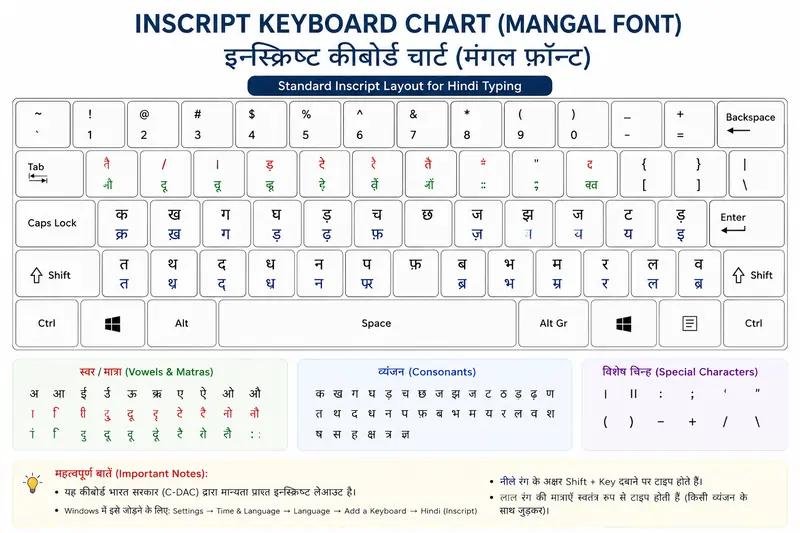
- Hindi InScript keyboard
- Remington GAIL keyboard
- Hindi Phonetic keyboard
1. Hindi InScript Keyboard Layout
InScript is a standardised keyboard layout designed for Indian-language typing.
The layout organises characters according to the structure of the Indian scripts. In the traditional arrangement, consonants and vowels are placed in separate keyboard regions, making the layout systematic once you learn the key positions.
Some important features of InScript include:
- Hindi vowels and consonants have defined key positions.
- Shift combinations provide additional characters.
- Dependent vowel signs (matras) have their own key mappings.
- The layout supports the formation of Hindi conjunct characters.
- It is designed for direct Indian-language character input.
InScript is particularly useful for candidates who want to learn a standardised Hindi keyboard layout and develop transferable typing skills.
#
How InScript Typing Works
Suppose you want to type a Hindi word containing a consonant followed by a vowel sign.
InScript uses individual key mappings for consonants and dependent vowel signs. You type the required characters through the keyboard, and the input system produces the appropriate Unicode sequence.
The Hindi word बगीचा is a useful example.
On Microsoft's documented Hindi Traditional keyboard, the keystrokes are:
| Character | Keyboard Key |
|---|---|
| ब | Y |
| ग | I |
| ी | R |
| च | ; |
| ा | E |
The resulting word is: बगीचा
This is an example for the specific Windows Hindi Traditional layout documented by Microsoft. Do not assume that the same keys will produce the same output in Remington GAIL or another Hindi input method.
#
InScript Keyboard Layout Practice
Beginners should practise the keyboard in stages:
- Learn the basic vowel and consonant positions.
- Practise the normal and Shift key combinations.
- Learn the dependent vowel signs (matras).
- Practise words containing different matras.
- Move towards conjunct letters and longer Hindi passages.
---
2. Remington GAIL Keyboard Layout
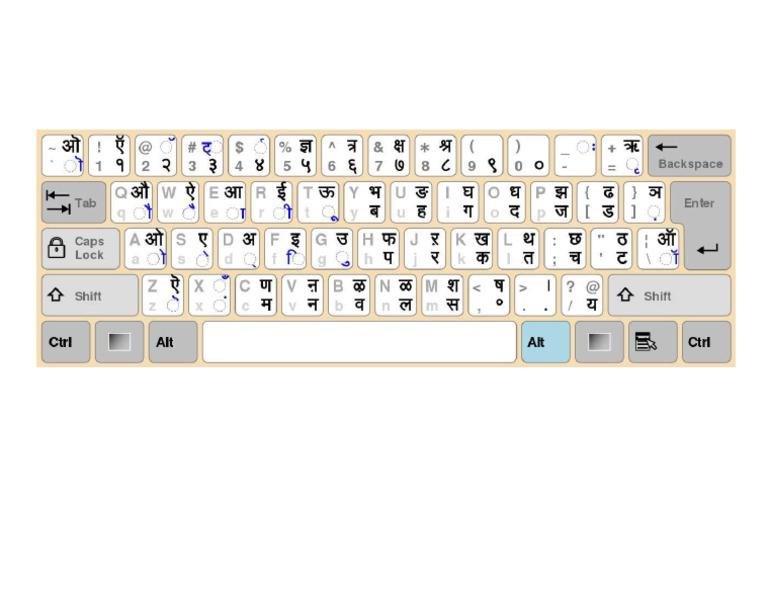
Remington GAIL is another commonly used Hindi typing layout, particularly among candidates preparing for clerical and other government typing examinations.
Unlike InScript, Remington GAIL follows a typewriter-style arrangement.
This means that its character positions are based on a different keyboard mapping. Candidates familiar with traditional Hindi typewriters may find this layout more comfortable.
Important characteristics include:
- Typewriter-style key arrangement.
- Different character positions from InScript.
- Special key combinations for producing Hindi characters.
- Use in various Hindi typing practice and examination environments.
#
Why Is Remington GAIL Important for Government Exams?
Different recruiting organisations specify different Hindi typing requirements.
Some examinations require candidates to use Mangal Unicode with a particular keyboard arrangement, while others specify a Remington-style layout or another input method.
For this reason, candidates should never assume that every Hindi typing examination uses InScript simply because it is a standardised layout.
Always check the official recruitment notification or typing-test instructions.
#
Remington GAIL vs InScript
| Feature | InScript | Remington GAIL |
|---|---|---|
| Layout Style | Standardised Indian-language keyboard | Typewriter-style keyboard |
| Key Positions | InScript mapping | Remington mapping |
| Learning Method | Character-position practice | Typewriter-style position practice |
| Shift Combinations | Yes | Yes |
| Suitable For | Standardised Hindi input | Exams and workplaces specifying Remington GAIL |
| Interchangeable | No | No |
If your target examination specifically asks for Remington GAIL, practise using that layout from the beginning.
---
3. Hindi Phonetic Keyboard
Hindi Phonetic typing is designed for users who are more comfortable typing Hindi words using English letters.
For example, you might type:
- `namaste` → नमस्ते
- `bharat` → भारत
- `hindi` → हिंदी
- `pustak` → पुस्तक
This is different from InScript and Remington because you do not need to memorise a traditional Hindi key-to-character mapping in the same way.
For beginners who want to write emails, messages or general Hindi content, phonetic input can be convenient.
However, if your government examination specifically requires InScript or Remington GAIL, phonetic typing should not be treated as a substitute.
---
How to Enable Mangal Hindi Typing in Windows 10 and Windows 11
Windows provides Hindi keyboard input options, allowing users to type Devanagari text without changing the display language of their computers.
You can enable Hindi typing through Windows language settings:
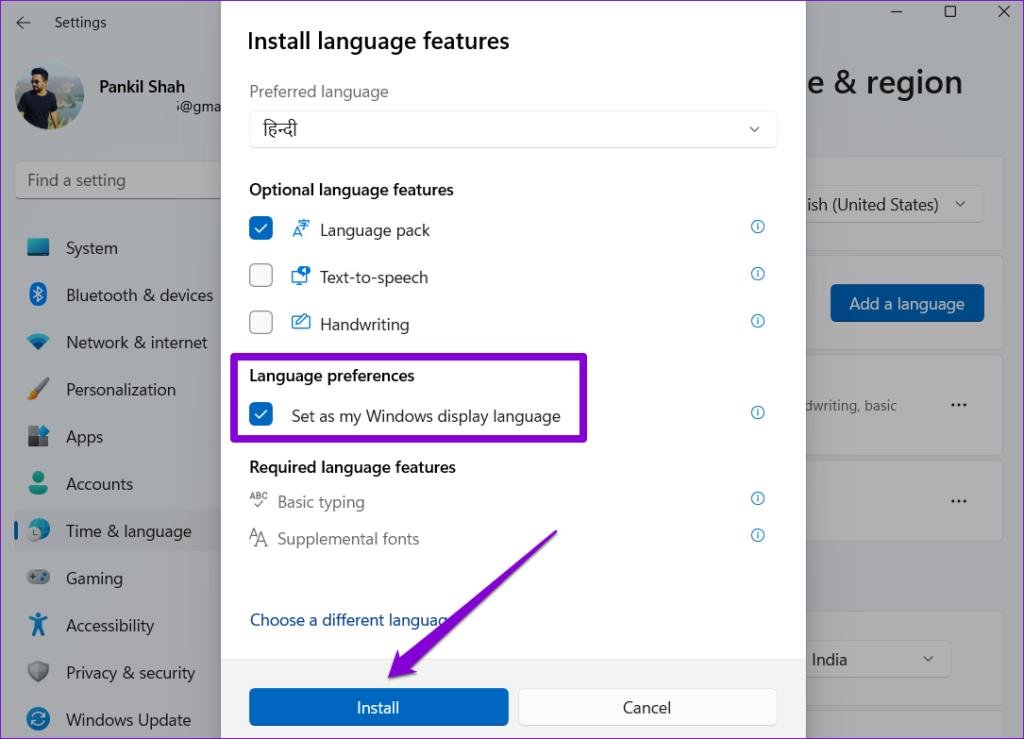
Step 1: Open Windows Settings
Press Windows Key + I to open the Settings application.Step 2: Open Language Settings
Navigate to Time & Language → Language & Region. This section allows you to add languages and manage keyboard options.Step 3: Add Hindi
Select Add a language. Search for Hindi (हिन्दी) and select it from the available language list. Follow the installation instructions.Step 4: Add a Hindi Keyboard
Open the Hindi language options and select the keyboard options. You can add the available Hindi keyboard layouts, including Hindi Traditional (InScript) and Hindi Phonetic where supported. Choose the layout that matches your intended typing method.Step 5: Switch Between English and Hindi
Once Hindi has been installed, you can switch between the available keyboard layouts using: Windows Key + Spacebar (or Alt + Shift).The active input layout will be shown in the Windows taskbar. Select Hindi when you want to type Hindi and switch back to English when needed.
Step 6: Select Mangal in Your Application
If you are working in Microsoft Word and want to display your Hindi text using Mangal:- Open Microsoft Word.
- Type or paste your Unicode Hindi text.
- Select the Hindi text.
- Open the font dropdown.
- Select Mangal, if installed.
- Check that the Hindi characters and matras are displaying correctly.
---
Mangal Typing vs Kruti Dev Typing
Another common question among Hindi typing learners is whether Mangal and Kruti Dev are the same.
They are completely different.
Mangal is a Unicode-based Devanagari font, whereas Kruti Dev is a legacy Hindi font commonly associated with older non-Unicode typing workflows.
The difference affects how Hindi text is stored, shared and processed:
| Feature | Mangal | Kruti Dev |
|---|---|---|
| Technology | Unicode Standard | Legacy 8-bit Font Encoding |
| Main Use | Modern digital documents, websites & exams | Older government department workflows |
| Text Compatibility | Broad Unicode compatibility across all devices | Depends on Kruti Dev font being installed |
| Searchability | Unicode text can be searched and indexed normally | Text cannot be searched on Google or web |
| Copy and Paste | Works across WhatsApp, web browsers & Word | Appears as garbled English symbols without the font |
| Conversion | No special conversion needed | Conversion tools required to transform to Unicode |
For modern digital documents, Unicode Hindi typing offers important compatibility advantages. However, some government examinations may still specify a particular legacy font or typing workflow. Always follow the examination notification.
---
Common Problems in Mangal Hindi Typing
Beginners often encounter problems while setting up Hindi typing. Here are common issues and their solutions:
1. English Letters Appear Instead of Hindi
- Possible reason: The English keyboard is still active.
- Solution: Press Windows + Spacebar and select the required Hindi keyboard.
2. Wrong Hindi Characters Appear
- Possible reason: You are using a different keyboard layout from the one you have practised.
- Solution: Check whether the selected input method is Hindi Traditional (InScript), Remington GAIL or Hindi Phonetic.
3. Matras Appear Incorrectly
- Possible reason: Incorrect key combinations, missing Unicode input support or typing order confusion.
- Solution: Test the input in a Unicode-compatible editor and confirm that you are typing the consonant first, followed by the dependent vowel sign (matra).
4. Hindi Text Looks Different on Another Computer
- Possible reason: The destination application is using a different font (such as Nirmala UI or Aparajita).
- Solution: The underlying Unicode characters remain intact. Simply select the text and choose Mangal from the font dropdown if required.
5. Kruti Dev Text Does Not Display Correctly After Copying
- Possible reason: The source document uses legacy font encoding.
- Solution: Use an online Kruti Dev to Unicode converter rather than merely changing the font name.
6. Typing Speed Is Not Improving
- Possible reason: Focusing on raw speed instead of touch typing accuracy and home-row discipline.
- Solution: Practise basic character combinations before attempting long paragraphs. Increase your speed gradually while maintaining at least 95% accuracy.
How to Improve Your Mangal Hindi Typing Speed
Learning the keyboard is only the beginning. You also need regular practice to develop speed and accuracy:
Week 1: Learn the Keyboard
- Understand the selected keyboard layout (InScript or Remington GAIL).
- Memorize the home row, top row, and bottom row character positions.
- Practise normal and Shift combinations without looking at the keyboard.
- Recognise matras and common Hindi consonants.
Week 2: Practise Hindi Words
Start practising short Hindi words:- भारत, समय, भाषा, पुस्तक, विद्यालय, सरकार, विद्यार्थी, परीक्षा
- Concentrate on muscle memory and zero backspace usage.
Week 3: Practise Matras and Conjuncts
Move towards longer and more difficult words. Practise combinations involving:- ा, ि, ी, ु, ू, े, ै, ो, ौ
- Practise halant (्) combinations to form conjunct characters (जैसे: संयुक्त, प्रान्त, राष्ट्र, धर्म).
Week 4: Start Timed Typing Tests
Once you are comfortable with the keyboard, begin timed exercises:- Start with 2-minute and 5-minute tests, gradually moving to standard 10-minute and 15-minute exam tests.
- Monitor Gross WPM, Net WPM, Accuracy, and frequent mistake patterns.
- Never sacrifice accuracy for speed. In government exams, errors are heavily penalised.
Mangal Typing Practice on TypeHindi
You do not need to rely only on Microsoft Word to learn Hindi typing. TypeHindi provides dedicated, interactive tools to help you master the layout:
- Hindi Typing Practice: Practise words, sentences, and exam-level paragraphs with live WPM and error tracking.
- Interactive Hindi Keyboard Layout: Visualise normal and Shift key mappings with dynamic keyboard diagrams.
- Mangal Font Typing Test Simulator: Take real-time exam simulations calibrated to SSC, CPCT, and High Court test standards.
- Free Hindi Typing Tests: Timed typing exercises with certificate generation to test your performance.
Frequently Asked Questions (FAQs)
1. What is Mangal typing?
Mangal typing refers to entering Hindi Unicode text that is displayed using the Mangal font. It is commonly performed using a compatible Hindi input layout such as InScript or Remington GAIL.2. Is Mangal a keyboard layout?
No. Mangal is a Unicode OpenType font for the Devanagari script. InScript and Remington GAIL are examples of Hindi keyboard layouts.3. Which keyboard layout is used for Mangal typing?
InScript and Remington GAIL can both produce Unicode Hindi text rendered in Mangal. The correct layout depends on your examination requirements.4. Is InScript better than Remington GAIL?
Neither is universally better. InScript is a standardised Indian-language layout mandated for e-governance (IS 16350:2016), while Remington GAIL is preferred by typists trained on mechanical typewriters and in exams like CPCT and Allahabad High Court.5. Can I use Mangal in Microsoft Word?
Yes. If the Mangal font is installed on your Windows system, select it from the font dropdown in Word to display your Hindi Unicode text.6. How do I enable Hindi typing in Windows 11?
Open Settings (Win + I) → Time & Language → Language & Region → Add a language → Select Hindi → Install Hindi Traditional (InScript) or Hindi Phonetic. Switch layouts anytime using Win + Spacebar.7. Is Mangal Unicode?
Yes. Mangal is Microsoft's default Unicode-compliant OpenType font designed specifically for the Devanagari script.8. What is the difference between Mangal and Kruti Dev?
Mangal is a Unicode font where characters have global standard encodings. Kruti Dev is a legacy 8-bit font that remaps English ASCII characters into Hindi glyphs. They cannot be interchanged simply by renaming the font.9. Can I learn Mangal typing online?
Yes. You can use TypeHindi's free online Hindi typing tools, keyboard layout guides, and timed practice sessions to learn and master Mangal typing from home.10. Is Hindi Phonetic the same as InScript?
No. Hindi Phonetic typing uses English alphabet transliteration (e.g., typing 'bharat' produces 'भारत'). InScript uses direct key-to-character mapping designed specifically for Indian languages.11. Do I need to install the Mangal font separately?
Mangal is pre-installed on modern Windows editions (Windows 10 and 11) whenever Hindi language features are added. You do not need to download third-party files.12. Which Hindi keyboard should I learn for a government typing test?
Always refer to the official recruitment notification. SSC exams usually support both InScript and Remington, whereas State High Courts or Police clerical tests may specify one particular layout.---
Final Words
Mangal typing is an essential skill for candidates preparing for government typing examinations and anyone working with official Hindi documentation.
Remember the core distinction: Mangal determines how your Hindi text looks on the screen, while InScript and Remington GAIL determine which keys you press to produce that text.
Choose the layout prescribed for your target exam, practice home-row keys systematically, and use TypeHindi's free interactive practice tests to build the typing speed and 95%+ accuracy needed to crack your examination.
Prepare & Test Your Speed on TypeHindi
Practice full 10-minute exam simulations for SSC CHSL, High Courts, and state clerical exams with real WPM & accuracy scoring.
Mandated by SSC for Hindi typing tests. Practice with official Unicode InScript layout and realistic passages.
Step-by-step interactive lessons for beginners. Master finger positions on home row, top row, and bottom row.
Interactive visual map of all vowels, consonants, halants, and special conjunct characters in Devanagari script.
Build muscle memory and reflex speed while destroying falling words in Hindi and English.
Interactive steno stroke teacher, vector animated demonstrations, word builder, and 40–120 WPM audio dictations.
Related Articles & Typing Guides
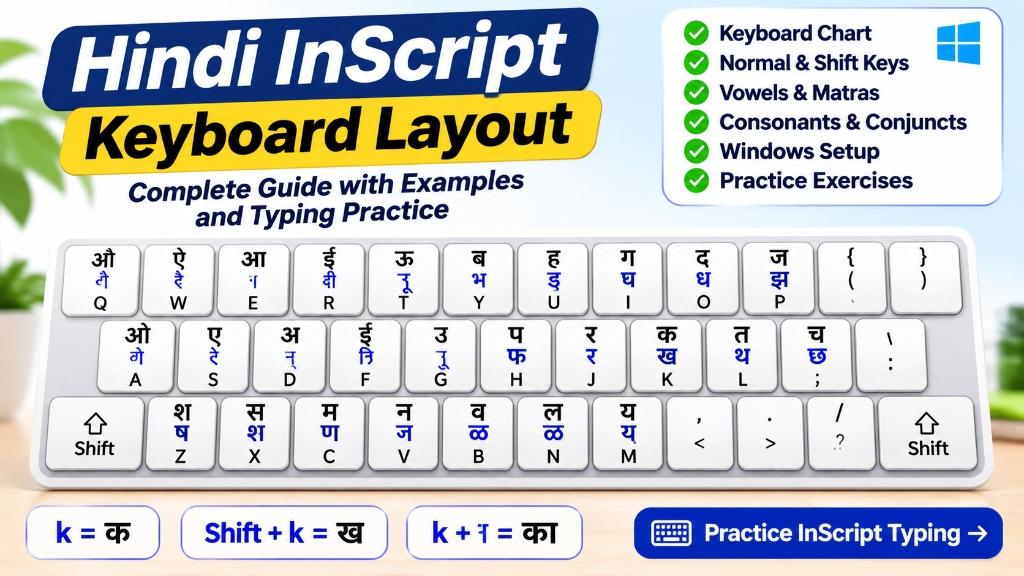
Hindi InScript Keyboard Layout: Complete Guide with Examples and Typing Practice
Master the Hindi InScript keyboard layout with our complete guide. Learn normal and Shift key combinations, vowel and consonant charts, matras, halant, Windows 11 setup, and practice exercises.
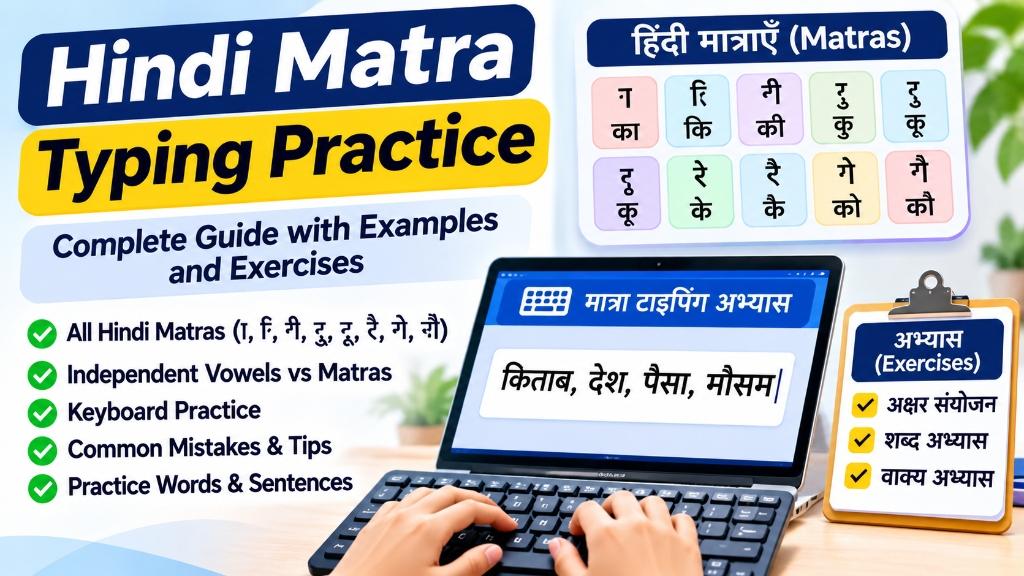
Hindi Matra Typing Practice: Complete Guide with Examples and Exercises
Master all Hindi matras (मात्राएँ) with our comprehensive typing guide. Includes complete vowel charts, consonant combinations, independent vs dependent vowels, common mistakes, and step-by-step practice exercises.

IIEST Shibpur Recruitment 2026: Apply Online for 12 Superintendent, Personal Assistant and Senior Assistant Posts
IIEST Shibpur has invited online applications for 12 non-teaching positions including Superintendent, Personal Assistant and Senior Assistant under Advt Nos. RO/NO/26/35 and RO/NO/26/34. Apply via SAMARTH portal by 9 Dec 2026 and submit Google Form with PDF by 14 Dec 2026.

National Library LIS Intern Recruitment 2026: Apply Online for 25 Posts, ₹25,000 Monthly Stipend
The National Library, Ministry of Culture, Government of India has invited online applications for 25 LIS Intern positions across 23 Indian languages with a monthly stipend of ₹25,000 under Notice No. ADM/S-I(40)/Intern.26-27/5143. Check language-wise posts, eligibility & selection process.