
State-wise LDC Typing Exam Rules and Requirements
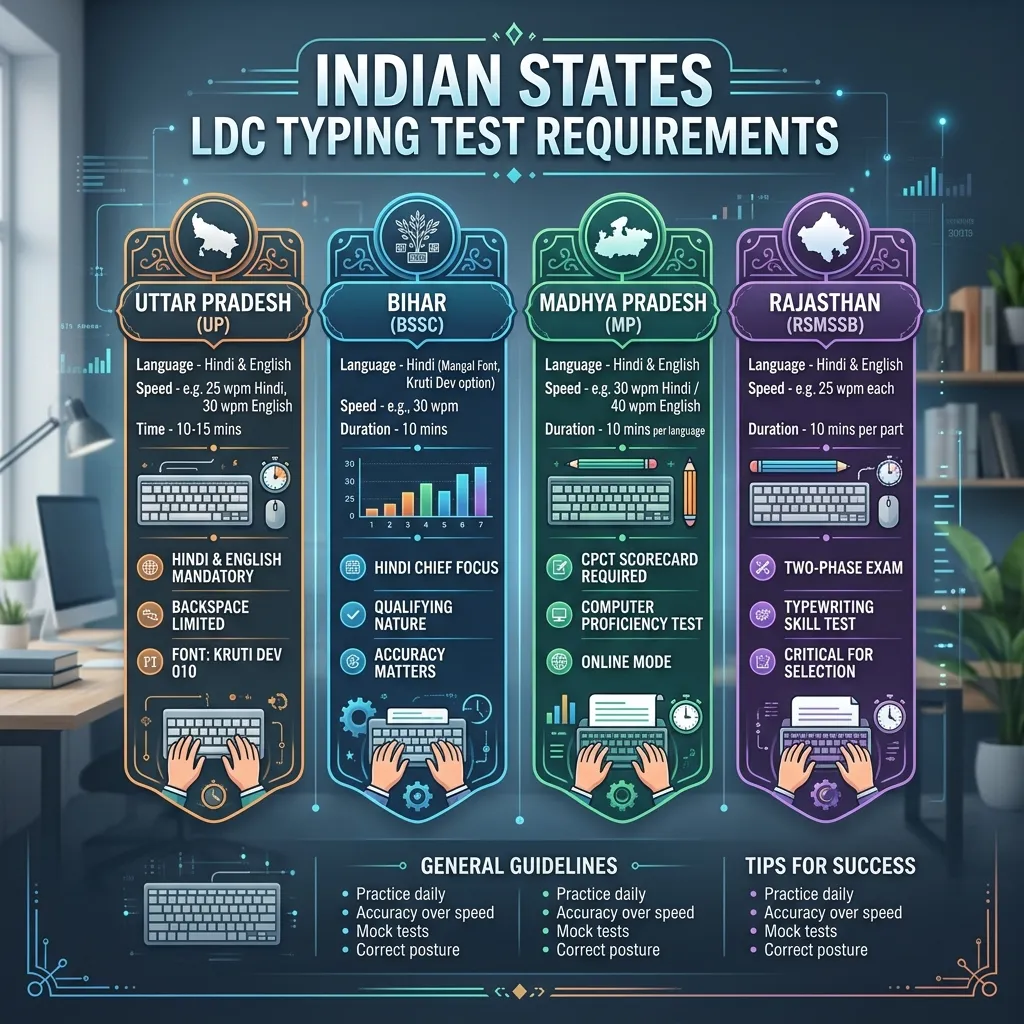
In India, a large number of government vacancies are released for posts like Lower Division Clerk (LDC), Junior Assistant, Data Entry Operator (DEO), and Court Clerk. A highly crucial stage in the selection process for all these recruitments is the—Computer Typing Test.
Many candidates score excellent marks in the written exam, but fail at the last moment because they lack proper knowledge of the diverse typing test rules, keyboard layouts, and speed calculation criteria.
Since each state in India (like Uttar Pradesh, Bihar, Madhya Pradesh, Rajasthan, Haryana, etc.) conducts typing tests according to its own administrative rules, there is a significant difference in their rules, acceptable keyboard layouts (such as InScript, Remington Gail, or KrutiDev), and the minimum speed limits.
In this detailed article, we will discuss the rules, keyboard layouts, speed calculation formulas, and best preparation strategies for the typing tests conducted for LDC and Junior Assistant posts in major Indian states.
---
# Why is the LDC Typing Test Important?
A large portion of the administrative work in state governments is done in both the local official language (especially Hindi) and English.
Proficiency in typing is mandatory for clerks for official correspondence, file noting, drafting, and digital data entry. In many states, the typing test is only of a Qualifying nature (meaning you just need to pass), while in some states (like Rajasthan), the marks of the typing exam are directly added to the Merit List.
---
# Rules and Criteria for LDC Typing Tests in Major States
1. Uttar Pradesh (UPSSSC Junior Assistant)
In the Junior Assistant exam conducted by the Uttar Pradesh Subordinate Services Selection Commission (UPSSSC), it is mandatory to pass the typing test in both Hindi and English languages.
* Hindi Typing Speed: Minimum 25 Words Per Minute (WPM) * English Typing Speed: Minimum 30 Words Per Minute (WPM) * Acceptable Keyboard Layout (Hindi): Unicode-based Mangal Font on InScript or Remington Gail. * Time Duration: 5 minutes for each language. * Special Rules: This test is purely qualifying in nature. Net Speed is calculated for error evaluation.
---
2. Bihar (BSSC LDC & Court Clerk)
The typing criteria for LDC and Clerk posts under the Bihar Staff Selection Commission (BSSC) and various courts in Bihar are as follows:
* Hindi Typing Speed: Minimum 30 Words Per Minute (WPM) * English Typing Speed: Minimum 35 Words Per Minute (WPM) * Keyboard Layout (Hindi): Unicode-based Mangal Font (Remington Gail or InScript). KrutiDev option is also given in some court exams. * Error Limit: Bihar exams have very strict rules on accuracy. Typically, if mistakes exceed 1.5% to 2%, the candidate is directly declared failed.
---
3. Madhya Pradesh (MP CPCT & Patwari/Clerk)
In Madhya Pradesh, possessing a CPCT (Computer Proficiency Certification Test) scorecard has been made mandatory for any Clerk, Junior Assistant, or Data Entry Operator post.
* Exam Structure: This exam consists of a 75-mark computer theory paper (MCQs), followed by a typing test in both Hindi and English. * Speed Requirements: * English Typing: Minimum 30 WPM (to pass) * Hindi Typing: Minimum 20 WPM (to pass) * Keyboard Layout (Hindi): The option to choose InScript or Remington Gail with Mangal font is provided. * Special Benefit: If you achieve 30+ WPM or 40+ WPM in Hindi, your scorecard grading is better, which increases the chances of selection in major recruitments.
---
4. Rajasthan (RSMSSB LDC & High Court LDC)
The typing exam in Rajasthan is considered the toughest and most crucial because the typing test marks are added to the final selection (Merit).
* Exam Structure (Total 100 Marks): 1. Speed Test: 25-25 marks for both Hindi and English (Minimum 9 WPM / 25 WPM speed required). 2. Efficiency Test: 25-25 marks for Hindi and English. It tests practical knowledge of MS Word and MS Excel (like making tables, formatting, header/footer, formulas, etc.). * Keyboard Layout: For Hindi, an option of KrutiDev 010 or Mangal Font (InScript/Remington) is given. * Time Duration: 10 minutes are allotted for each test.
---
5. Haryana (HSSC Clerk)
The typing rules for clerk posts by the Haryana Staff Selection Commission (HSSC) require candidates to pass in any one language:
* English Typing Speed: Minimum 35 WPM * Hindi Typing Speed: Minimum 30 WPM * Keyboard Layout (Hindi): Mangal Font (InScript).
---
6. Jharkhand (JSSC LDC & Steno)
Hindi typing is mandatory in clerical exams conducted by the Jharkhand Staff Selection Commission (JSSC):
* Hindi Typing Speed: Minimum 25 Words Per Minute (WPM) * Keyboard Layout: Mangal Font (KrutiDev or InScript). * Special Rules: A paragraph of total 250 words must be typed in 10 minutes in the test. Only a 2% mistake relaxation is allowed. Overstepping this limit disqualifies the candidate.
---
# Typing Speed and Mistake Calculation Rules (Evaluation Rules)
Different commissions have different rules for calculating typing speed. Mainly two rules are followed:
1. Gross Speed vs Net Speed
* Gross Speed: This means the total number of words you typed per minute (whether they are right or wrong). * Net Speed: This signifies the number of words you correctly typed per minute. In most exams, Net Speed is considered the primary criterion.
$$ ext{Net Speed (WPM)} = rac{ ext{Total Correct Words}}{ ext{Time in Minutes}}$$
2. Classification of Mistakes (Half & Full Mistakes)
* Full Mistake: * Completely omitting a word. * Typing an extra word not written in the paragraph. * Typing the wrong spelling of a word. * Half Mistake: * Typing lowercase letters instead of uppercase (Capital Letters) in English. * Failing to provide proper spacing or giving double spacing in the paragraph. * Punctuation mistakes.
---
# How to Choose a Keyboard Layout for LDC Exams?
Since most state-level exam commissions currently use Unicode-based Mangal Font, you have two main options:
Additionally, our guide on How to Build a Career by Learning Hindi Typing is very helpful for exploring other opportunities in typing careers.
---
# Practical Strategies to Achieve Success
* Prioritize Accuracy: Try to maintain 95%+ accuracy right from the start. Study our 10 Most Common Mistakes in Hindi Typing guide to correct errors. * Use a Real Keyboard: Instead of practicing on a laptop keyboard, use an external keyboard, as test centers often provide ordinary desktop keyboards. * Practice in an Exam-like Environment: Sit in a quiet room and practice by setting a timer for 5 or 10 minutes. * Regular Mock Tests: Visit TypeHindi.in daily and take a Mock Test to check your speed and progress.
---
# Frequently Asked Questions (FAQ)
Are you allowed to carry your own keyboard in the LDC exam?
No. In most government exams, you must use the standard keyboard provided by the exam center.Does using Backspace reduce speed?
Yes. Pressing backspace not only wastes extra time but also breaks the typing rhythm. Therefore, try to type correctly without making mistakes.Does the paragraph appear on the computer screen or on paper in the exam?
This depends on the examination board. Nowadays, most exams have Screen-to-Screen typing, but some states still ask candidates to type by looking at a hard copy on paper.Should I learn English typing along with Hindi typing?
Yes. Knowledge of both languages is mandatory in exams in states like UP and Bihar, while it gives you an added advantage in other states.---
# Conclusion
Even though the typing rules for LDC and Junior Assistant exams differ across various states, consistency, correct sitting posture, and high accuracy remain the sole keys to success. Before beginning your preparation, carefully read the official notification of your target exam and choose your keyboard layout (like InScript or Remington) accordingly. By practicing scientifically every day, you can easily pass the exam.