
Tips to Increase Hindi Typing Speed and Efficiency for Office Work
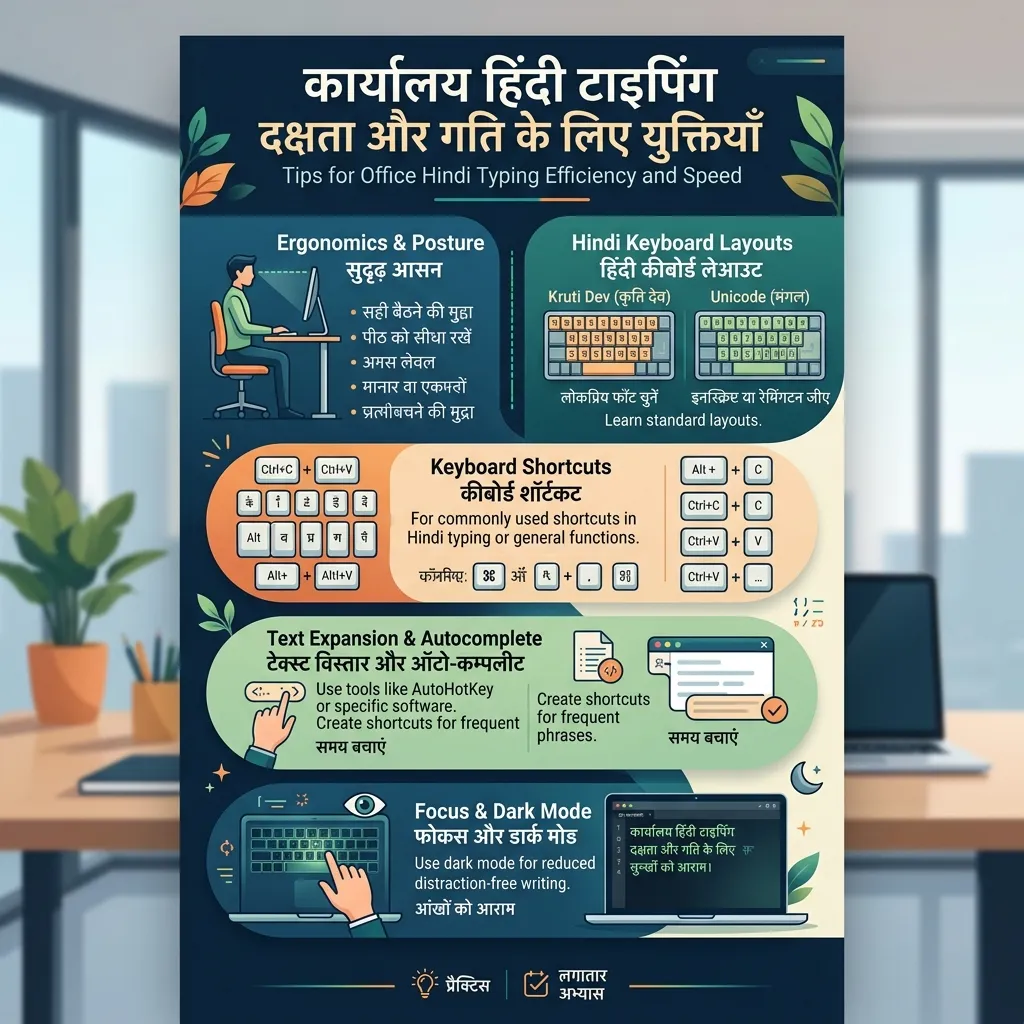
If you are working as a Clerk (LDC), Junior Assistant, Court Clerk, Translator, Content Writer, or Data Entry Operator in a government department, Hindi Typing is your most daily and important task in office life.
Sitting continuously in front of a computer screen for hours preparing Hindi file notings, Drafting letters, and feeding data can be not only mentally exhausting but also physically stressful.
Often, due to a heavy workload in offices, more work has to be completed in less time. In such cases, merely typing fast is not enough, but using Smart Techniques and efficiency-boosting methods is absolutely essential.
In this detailed Office Hindi Typing Guide, we will discuss the scientific methods, keyboard shortcuts, Ergonomics, and software tricks that will reduce your workload, increase typing speed, and improve the quality of your work.
---
# 1. Smart Use of Text Expansion and Auto-Correct
Many long administrative words and phrases are repeatedly used in office work. For example: * *"माननीय मुख्यमंत्री महोदय, उत्तर प्रदेश शासन" (Honorable Chief Minister, Government of Uttar Pradesh)* * *"अधीनस्थ सेवा चयन आयोग" (Subordinate Services Selection Commission)* * *"कृपया आवश्यक कार्यवाही सुनिश्चित करें" (Please ensure necessary action)* * *"सादर सूचनार्थ एवं आवश्यक कार्यवाही हेतु प्रेषित" (Submitted for kind information and necessary action)*
Typing these long sentences manually over and over is a waste of time.
How to set Auto-Correct in MS Word:
Now, whenever you type "ups" and press space in a Word document, the software will automatically change it to "उत्तर प्रदेश शासन". With this one trick, you can cut your daily drafting time in half.
---
# 2. Using Voice Typing as a Backup Tool
When you have the task of preparing a very long letter or report and your fingers are exhausted from continuous typing, Voice Typing (typing by speaking) is a great alternative.
* Google Docs: If the internet is available on your office computer, open Google Docs. Go to Tools -> Voice Typing, select "Hindi" in the language, and start speaking with the microphone on. * Windows In-Built Voice Typing: In Windows 10/11, you can use Windows' in-built Hindi voice dictation by pressing Win + H.
Important Tip: You can prepare the initial Draft very quickly with voice typing. After that, fix punctuation marks, matras, and spelling errors with the help of the keyboard. This significantly reduces the strain on finger joints.
---
# 3. Practicing Special Characters and Alt Codes
While using keyboard layouts like KrutiDev or Remington Gail, some complex Hindi characters (such as: ह्र, द्व, ह्य, क्ष्, त्र, श्र) do not have direct buttons on the keyboard. Special Alt Codes have to be used for these (such as: Alt + 0170 or Alt + 0216).
* Create a Chart: Stick a small printout of these codes near your desk in the office. Type them by looking initially, and gradually they will fit into your muscle memory. * The Benefit of InScript: If you use the InScript layout, you hardly ever need alt codes, because all conjunct letters are typed using scientific key combinations (Shift + Key). To set up InScript, check out our InScript Setup Guide.
---
# 4. Proper Ergonomics and Sitting Posture
Due to working continuously for 8-9 hours in the office, problems like Lower Back Pain, Cervical Pain (stiffness in the neck), and Carpal Tunnel Syndrome (strain in the wrist nerves) are common among typists. The correct sitting posture affects both your efficiency and health.
* Chair and Spine: Keep your spine completely straight. Sit all the way back in the chair, placing a small cushion for lower back support if necessary. * Wrist Position: While typing, your wrists should not rest or bend on the keyboard. They should be slightly elevated in the air so that fingers can easily move up and down. * Screen Height: The top of the monitor screen should be at your Eye Level so that you do not have to tilt your neck down.
---
# 5. Dark Mode and Eye Protection
Blue Light emitting from white screens is the main cause of dryness, burning, and blurred vision in the eyes.
* Software Settings: Enable Dark Mode in MS Word, Google Docs, and your email client. * The 20-20-20 Rule: After every 20 minutes of typing, look away from the computer screen at an object 20 feet away for 20 seconds. This provides relief to the eye muscles. * Dark Theme on TypeHindi.in: Whenever you practice on the website, keep dark mode turned on. It reduces eye strain and helps to concentrate.
---
# 6. Develop Muscle Memory
If you look at the keyboard repeatedly while typing, you will never be able to achieve speed and accuracy. Looking at the keyboard distracts you, and you fail to notice mistakes on the screen on time.
* Touch Typing: Always keep fingers on the Home Row (ASDF / JKL). Memorize which button is pressed by which finger without looking. Read our Muscle Memory: The Scientific Way to Learn Fast Typing guide for its scientific method. * See our InScript vs Remington Keyboard Guide for a comparative study of the major keyboard layouts (like InScript and Remington). * Refer to the SSC CGL and CHSL Hindi Typing Rules and State-wise LDC Typing Rules guides for government exam preparation. * Read our 10 Most Common Mistakes in Hindi Typing guide to minimize typing mistakes. * Visit TypeHindi.in and take a Mock Test daily to test your daily progress.
---
# Frequently Asked Questions (FAQ)
Can hand and wrist pain be prevented from continuous typing in the office?
Yes. Adopting the correct sitting posture (Ergonomics), not resting wrists on the keyboard, and taking a 2-minute break every 30 minutes can prevent wrist pain.Which font is used the most in government offices?
Currently, the use of the Unicode-based Mangal Font has been made mandatory in the offices of the central and most state governments. Check out our Unicode and Mangal Font Guide for more details.Can I do voice typing without the internet?
Yes, in Windows 11, basic voice typing can be done without the internet by downloading the Hindi Language Pack for offline speech recognition.---
# Conclusion
Hindi typing work in the office can be tiring, but by adopting smart tricks like—Auto-Correct, Voice Drafting, Alt Codes shortcuts, and Proper Ergonomics, you can not only increase your speed and efficiency but also protect your health. Smart work is the foundation of your office success. Apply these tips to your daily life from today and make your work easier!